Perpetuals on Vault
Vault lets you trade perpetual futures on Hyperliquid without leaving the app. This guide covers how perpetuals work, how to open and manage positions, and what to know about margin, funding, and risk before you trade.
What are perpetuals?
A perpetual future (or “perp”) is a derivative contract that tracks the price of an underlying asset — like BTC or ETH — but never expires. Unlike spot trading, where you buy and hold the actual asset, a perp lets you speculate on price movement in either direction without owning the underlying token.
Because there's no expiry date, perps use periodic funding payments between long and short traders to keep the contract price anchored to the real spot price. Perps also let you trade with leverage, meaning you can open a larger position than your account balance alone would allow — this amplifies both potential gains and potential losses.
Vault routes perps trading through Hyperliquid, a dedicated perpetuals exchange. Your margin sits in your Hyperliquid account, funded from USDC in your Vault wallet.
Opening a position
Every order on the Perps page walks through the same steps, whether you're going long or short.
Open the Perps page
From the sidebar, open Trade and select Perpetuals. This is Vault's interface into Hyperliquid's perpetual futures markets.
Choose a market
Pick the asset you want to trade, for example BTC or ETH. Each market shows its own max leverage and current funding rate.
Pick a direction and order type
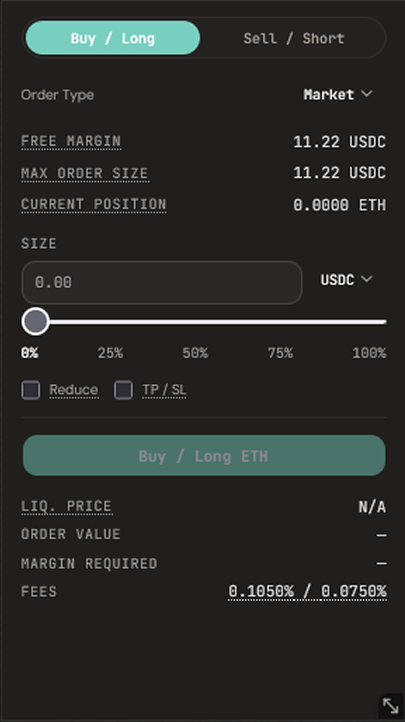
Choose Buy / Long or Sell / Short, then an order type — Market, Limit, Stop Market, Stop Limit, Take Market, Take Limit, or TWAP.
Enter size and review the order
Set a size using the input or the percentage slider. Vault shows your liquidation price, order value, margin required, and fees before you confirm anything.
Confirm your order
Submit the order once the details look right. Open positions and orders appear in the positions panel below the chart.
Order types
Market
Fills immediately at the best available price.
Limit
Fills only at your specified price or better.
Stop Market / Stop Limit
Triggers a market or limit order once price crosses a trigger — commonly used as a stop loss.
Take Market / Take Limit
Triggers a market or limit order once price crosses a trigger — commonly used to take profit.
TWAP
Splits a large order into smaller sub-orders over time to reduce market impact, with an option to randomise timing.
Margin and leverage
Margin is the collateral backing your position. Vault supports Hyperliquid's two margin modes, selectable per market from the trading panel:
Cross
All cross positions share your account’s cross margin balance as collateral. If one position is liquidated, your shared cross margin — and other open cross positions — may be forfeited with it.
Isolated
Margin is restricted to a single position, so a liquidation on that position doesn’t touch the rest of your account. You can add or remove margin from an isolated position at any time.
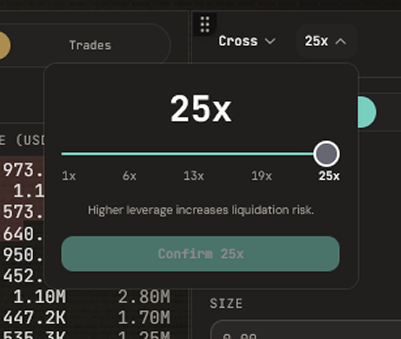
Each market has its own maximum leverage, shown next to the leverage control. Higher leverage means a smaller price move against you moves your liquidation price closer to the current price — so increasing leverage always increases risk, even though it also reduces the margin required to open the same size position.
Funding and fees
Funding is a periodic payment exchanged directly between long and short traders — not paid to Vault or Hyperliquid — that keeps the perpetual's price aligned with the underlying spot price. If funding is positive, longs pay shorts; if negative, shorts pay longs. Funding rates are shown on the market you're trading and change continuously with market conditions.
Every order also carries a trading fee, shown as a taker / maker rate in the order form before you submit. That rate combines Hyperliquid's own exchange fee with Vault's flat platform fee of 0.06% on Hyperliquid perps and spot. Tap the fee rate in the order form for a full breakdown of each component.
For the complete platform fee schedule across swaps and Hyperliquid, see the Fees support page.
Managing risk
Trading with leverage means losses can move faster than they would in spot trading, so Vault surfaces the key risk figures directly in the order form rather than after the fact.
Liquidation price
Shown for every order before you submit it. If the market reaches this price, your position is automatically closed to prevent your losses from exceeding your margin.
Take profit / stop loss
Market and Limit orders can attach a TP / SL — set both a take-profit and a stop-loss price up front, and Hyperliquid triggers the corresponding close automatically.
Position sizing
Leverage changes how much margin a given position size requires, not how much risk it carries per unit of price movement. Sizing a position relative to your total account balance, not just your available margin, is what actually controls your risk.