Options on Vault
Vault integrates Derive so you can trade cash-settled crypto options from your wallet. This guide covers setting up and funding your options account, reading the option chain, placing a trade, and how expiry works.
What are options?
An option is a contract giving its buyer the right, but not the obligation, to buy (a call) or sell (a put) an underlying asset at a fixed strike price by a set expiry date. The buyer pays a premium up front — that premium is the most a buyer can lose.
Options on Vault are cash-settled through Derive, a dedicated options exchange. Nothing physically changes hands at expiry — positions settle to a cash value based on where the underlying closes, credited to or debited from your options account.
Your options balance lives in a separate account on Derive, funded from your Vault wallet — similar in spirit to how perps trade through a separate Hyperliquid account.
Setup and funding
Because options trade through a separate exchange, there's a one-time setup step before your first trade.
Register Derive account
Vault registers you an account with Derive, the options exchange Vault trades through, tied to your wallet.
Deploy smart wallet
A smart contract wallet is deployed on Derive Chain. This is what actually holds your options collateral and positions.
Create trading subaccount
A subaccount is created under your smart wallet — this is what you fund and trade from on the Options page.
Funding your options account
Once set up, deposit into your options account to start trading. Vault bridges USDC from your wallet onto Derive Chain and credits it to your subaccount's trading balance. The deposit form shows the route and any network fee before you confirm — on supported chains, that fee is covered from the USDC you're depositing, so you don't need a separate gas token.
The option chain
The option chain lists every strike for the underlying and expiry you've selected, with calls on the left and puts on the right. Each row shows live bid and ask prices — green for ask, red for bid — along with mark price, implied volatility, delta, volume, and open interest. You can choose which columns show from the column settings in the toolbar.
Expiries are shown as tabs above the chain — pick a closer expiry for shorter-dated exposure, or a further one for more time value. Tapping any bid or ask opens the trading slip with that specific contract selected: tap an ask to buy, or a bid to sell.
Placing a trade
Open a market and pick an expiry
From the sidebar, open Options. Choose an underlying (BTC, ETH, and others) and select an expiry tab.
Tap a bid or ask
The option chain lists calls on the left and puts on the right around each strike. Tap an ask to buy, or a bid to sell — this opens the trading slip with that quote selected.
Choose an order type
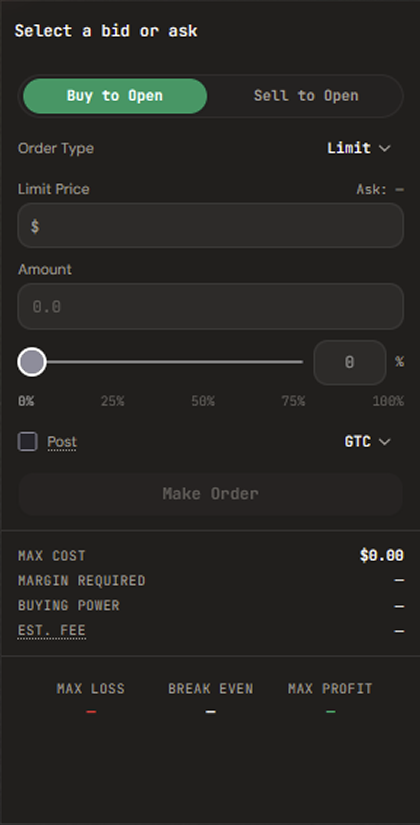
Pick Limit, Stop Limit, Take Limit, or TWAP, then set your limit price (and trigger price, for stop/take orders).
Enter an amount
Type a contract amount or drag the slider as a percentage of your max size. Vault shows Max Cost, Margin Required, Buying Power, and an estimated fee before you submit.
Review and submit
Check the payoff summary — Max Loss, Break Even, and Max Profit — then submit. Your wallet signs the order; there’s no separate confirmation step.
Order types
Limit
Fills only at your specified price or better. There is no market order type.
Stop Limit
Triggers a limit order once price crosses a trigger — commonly used as a stop loss.
Take Limit
Triggers a limit order once price crosses a trigger — commonly used to take profit.
TWAP
Splits a large order into smaller sub-orders over a duration you set, to reduce market impact.
Positions and closing
Open positions and orders appear in the positions panel below the option chain. Each position shows its mark price, average cost, margin, and unrealized P&L, alongside Close and take-profit / stop-loss actions.
Tapping Close doesn't exit immediately — it loads an opposite-side, reduce-only order into the trading slip with your position's size pre-filled, so you can review the price before submitting.
Expiry and settlement
Instrument names encode the underlying, expiry date, strike, and side, for example ETH-20260627-1650-C — an ETH call expiring June 27, 2026 at a $1,650 strike.
Options are cash-settled automatically at expiry based on where the underlying closes — there's no exercise step for you to take. If you'd rather lock in a result before expiry, close the position manually from the positions panel at any time.